Introduction
A modern, feature-rich Vue 3 Admin Dashboard built with Vue 3, TypeScript, and Tailwind CSS — packed with advanced complex logic features that go far beyond a typical template.
Smart Insights — API Keys & External Costs
Smart Insights works out of the box with local heuristic analysis (no API keys required). If you connect a third-party AI provider (OpenAI, Anthropic, Google Gemini, etc.), you must supply your own API keys via environment variables. External AI usage may incur additional costs billed by the provider.
Tech Stack
Installation
Get up and running in minutes.
package-lock.json is included — use npm ci for reproducible installs.
Step 1: Extract the Package
After downloading from CodeCanyon, extract the ZIP file to your desired location.
Step 2: Install Dependencies
cd adminex-vue
npm ci
Step 3: Start Development Server
npm run devhttp://localhost:5173
Step 4: Build for Production
npm run build
npm run preview
Requirements
Install these before setting up Adminex. Matching these versions prevents the most common installation errors.
| Tool | Minimum Version | Recommended |
|---|---|---|
| Node.js | 20.19.0 | 22.12.0 LTS+ |
| npm | 10.0.0 | 10.8+ |
| yarn | 1.22.22 | 4.x |
| pnpm | 9.0.0 | 10.x |
Package manager commands
- npm:
npm installornpm ci(uses includedpackage-lock.json) - yarn:
yarn install - pnpm:
pnpm install
Reproducible installs: This package includes package-lock.json. Always run npm ci (not a fresh resolve) so every buyer gets the same dependency versions.
Folder Structure
Organized and scalable architecture.
adminex-vue/
├── public/
│   └── assets/           # Static assets
│       ├── avatars/
│       ├── blogs/
│       ├── products/
│       └── logo/
├── src/
│   ├── components/       # Reusable components
│   │   ├── charts/
│   │   ├── common/
│   │   └── dashboard/
│   ├── composables/      # Vue composables
│   ├── data/             # Mock data
│   ├── features/         # Advanced feature modules
│   │   ├── query-builder/
│   │   ├── real-time-simulation/
│   │   ├── rule-engine/
│   │   ├── smart-insights/
│   │   ├── task-scheduler/
│   │   └── workflow-builder/
│   ├── i18n/             # Locale JSON files
│   │   └── locales/
│   ├── layouts/          # Page layouts
│   ├── pages/            # Page components
│   ├── router/           # Vue Router config
│   ├── stores/           # Pinia stores
│   ├── styles/           # Global CSS
│   └── types/            # TypeScript types
├── docs/                 # Developer markdown docs
├── documentation/        # Buyer HTML documentation
├── package.json
├── package-lock.json   # Lockfile for reproducible npm installs
├── vite.config.ts
└── tsconfig.json
Key Features
Everything you need to build amazing admin apps — and more.
6 Advanced Features
Rule Engine, Workflow Builder, Task Scheduler & more.
Fully Responsive
Works on all screen sizes from mobile to 4K.
Dark Mode
Beautiful dark theme with one-click toggle.
10 Languages
Built-in i18n with RTL support.
6 Color Themes
Blue, Purple, Green, Orange, Red, Cyan.
7+ Chart Types
Area, Bar, Line, Pie, Radar, Candlestick & more.
RTL Support
Full right-to-left support for Arabic, Urdu, Hebrew.
Dashboards
4 unique dashboard layouts.
Applications
8 full-featured applications.
Advanced Features
6 complex logic features with production-grade architecture — not just UI, but real engines and builders.
Rule Engine
Visual rule builder with conditional logic, nested groups, and real-time evaluation.
Query Builder
Dynamic query construction with drag-and-drop fields, operators, and SQL/JSON preview.
Real-Time Simulation
Live data streaming dashboard with configurable sources and real-time charts.
Smart Insights
Heuristic analytics with anomaly detection and recommendations. Demo uses local analysis; optional third-party AI requires your own API keys.
Workflow Builder
Visual workflow designer with node-based canvas, templates, and conditional branching.
Task Scheduler
Advanced task management with Gantt charts, dependency graphs, and cron scheduling.
Feature Architecture
Each feature follows a modular, self-contained architecture:
src/features/{feature-name}/
├── types.ts          # TypeScript interfaces
├── engine.ts         # Core business logic
├── config.ts         # Default configurations
├── use{Feature}.ts   # Vue composable
└── components/       # Feature UI components
    ├── {Feature}Dashboard.vue
    └── ...
Screenshots
The same demo previews shown on the Adminex landing page — dashboards and app pages with polished UI patterns.
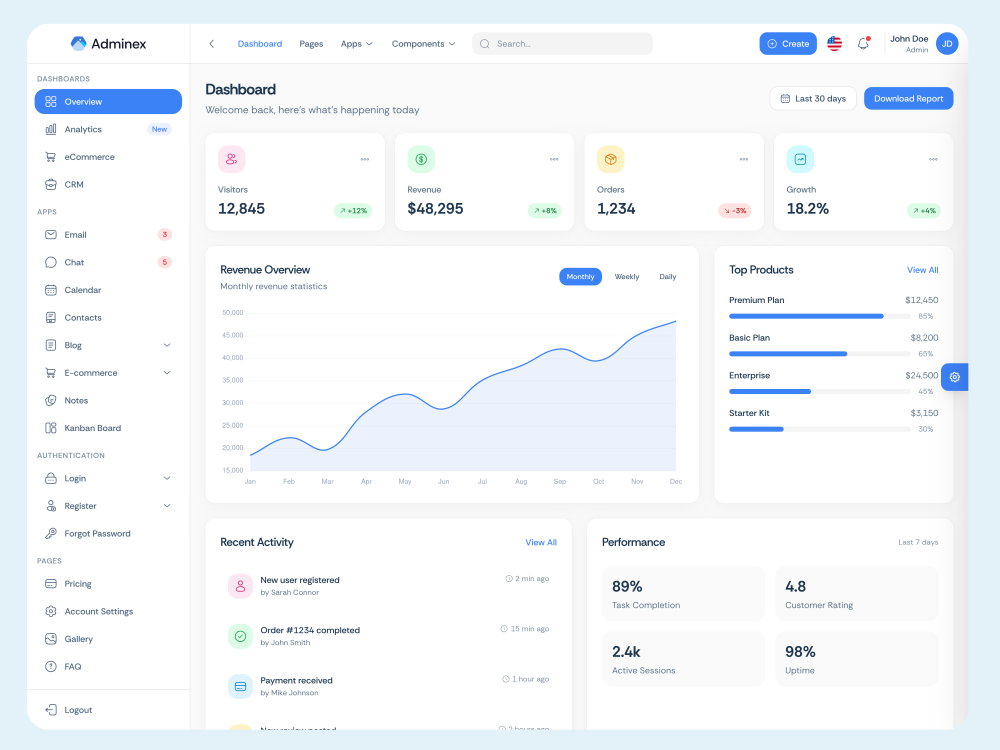
Overview (Light)
Clean, bright layout for daily work.
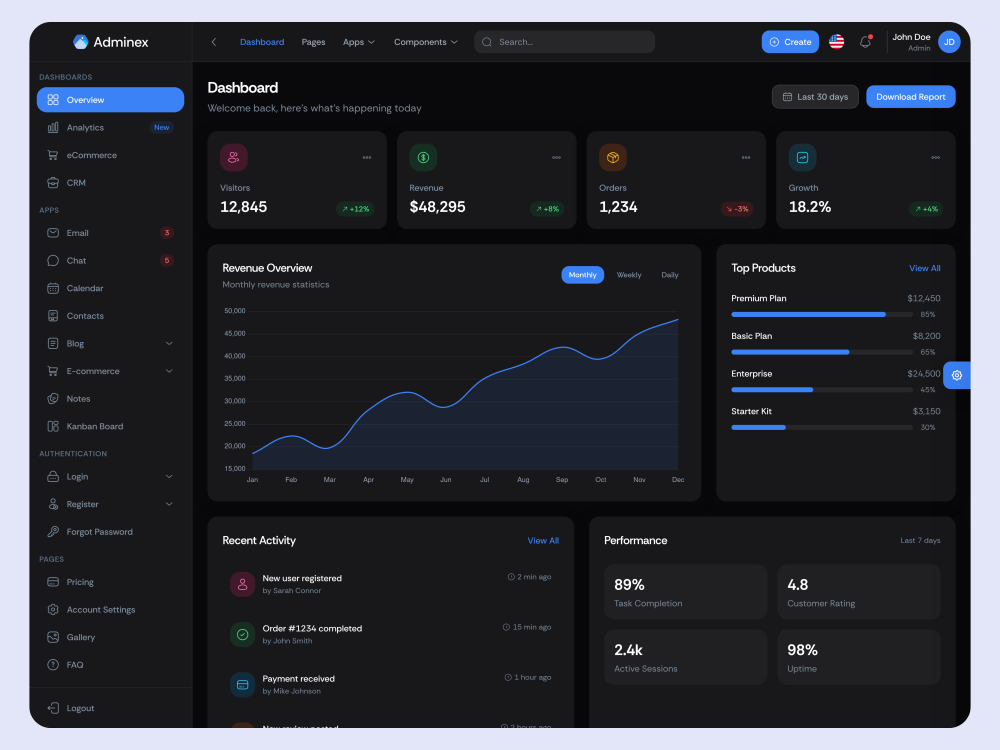
Overview (Dark)
Optimized contrast for dark themes.
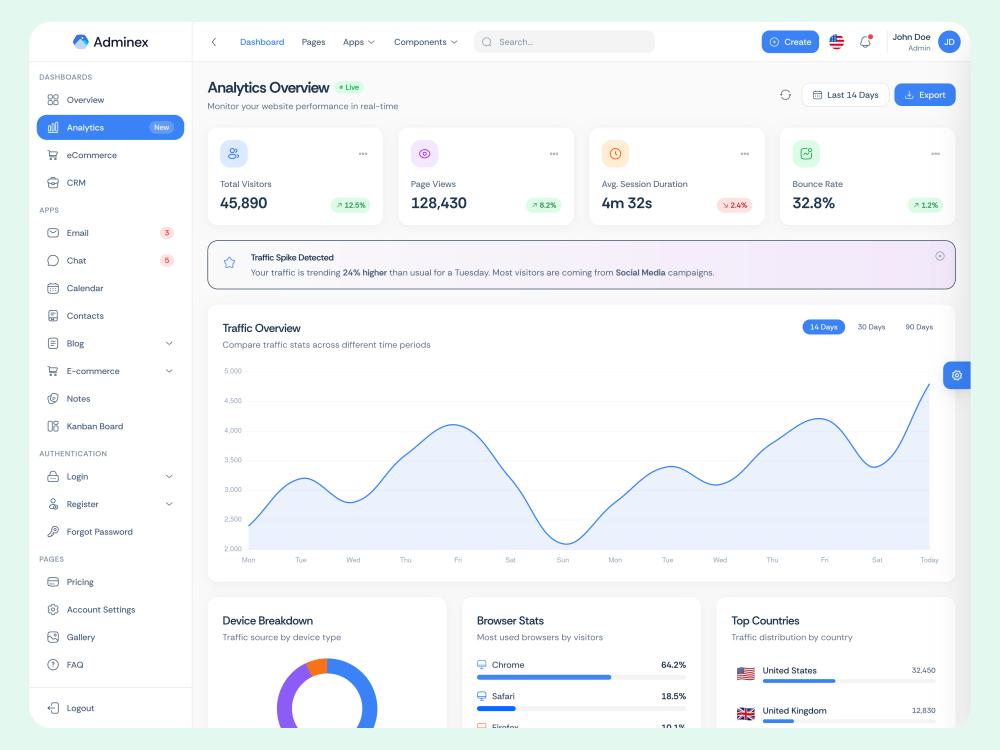
Analytics
KPIs, traffic sources, and trends.
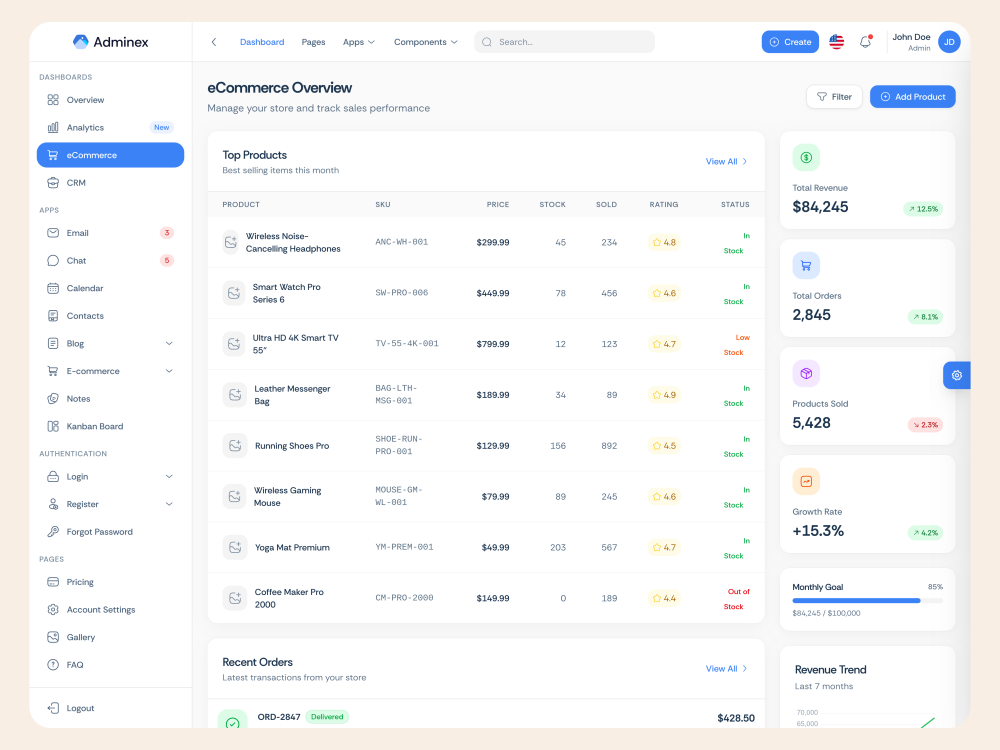
E-commerce
Orders, revenue, and conversion insights.
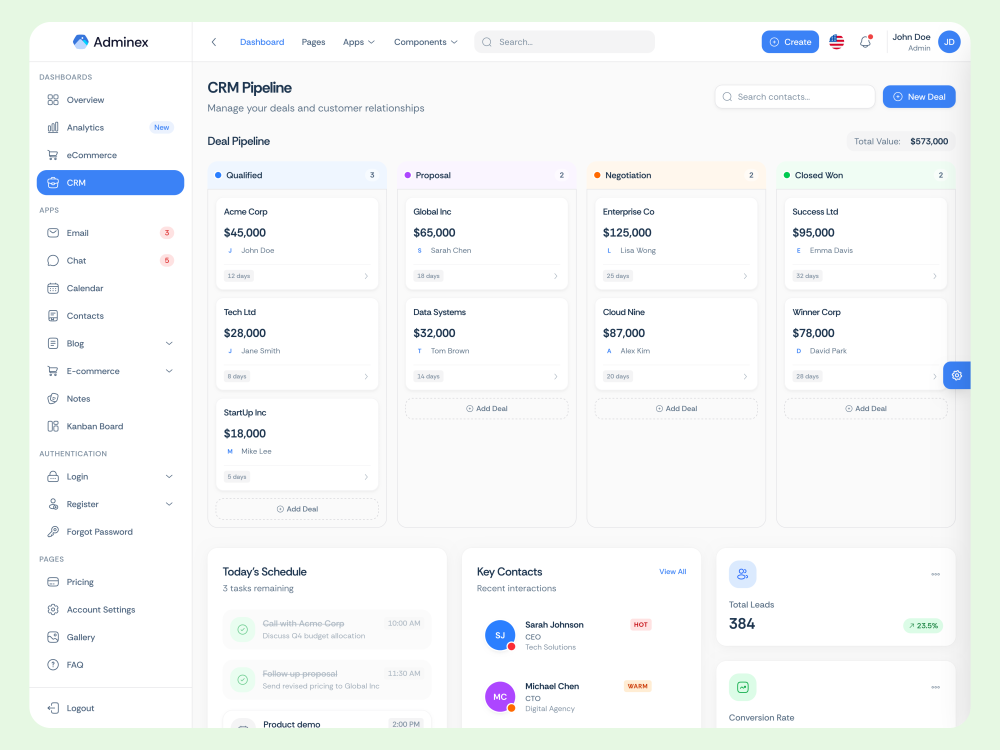
CRM
Pipeline overview and deal tracking.
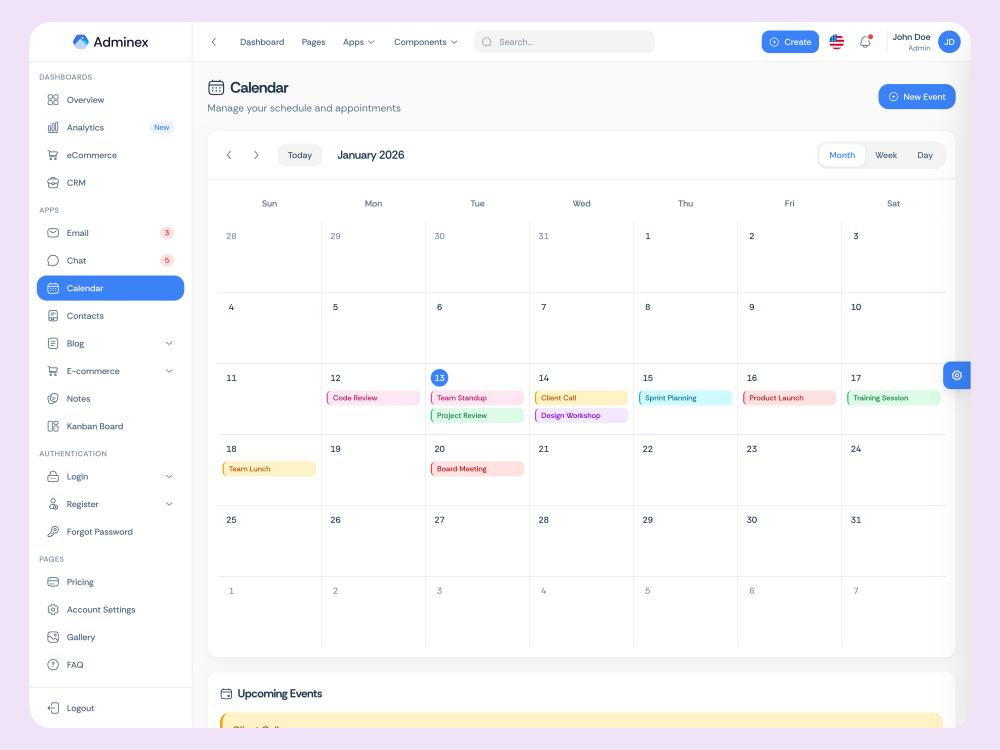
Calendar
Schedule, events, and productivity.
Theming
6 built-in color themes with customizable CSS variables.
Available Color Themes
Blue
#3b82f6
Default theme
Purple
#ec4899
Pink-based palette
Green
#22c55e
Fresh & eco-friendly
Orange
#f97316
Warm & energetic
Red
#ef4444
Bold & attention-grabbing
Cyan
#06b6d4
Cool & modern
Change Theme Color
import { useTheme } from '@/composables/useTheme';

const { setColor } = useTheme();

// Change to any available theme
setColor('blue');    // Default
setColor('purple');  // Pink-based
setColor('green');   // Fresh
setColor('orange');  // Warm
setColor('red');     // Bold
setColor('cyan');    // Cool
Theme Implementation
Colors are defined in src/types/theme.ts and applied via CSS variables:
-
--theme-primary- Main theme color -
--theme-accent- Complementary accent color -
Persists to localStorage automatically -
Works seamlessly with dark mode
Dark Mode
Light or Dark mode with persistent preference.
Toggle Dark Mode
import { useTheme } from '@/composables/useTheme';

const { setMode } = useTheme();

setMode('dark');   // Dark
setMode('light');  // Light
RTL Support
Right-to-left language support.
import { useTheme } from '@/composables/useTheme';

const { setDirection } = useTheme();

setDirection('rtl');  // RTL
setDirection('ltr');  // LTR
Languages
10 built-in languages.
Add New Language
// 1. Create: src/i18n/locales/ko.json
// 2. Register in src/stores/locale.ts
import koMessages from '@/i18n/locales/ko.json';

type Locale = 'en' | ... | 'ko';
const MESSAGES = { ...existingLocales, ko: koMessages };
User Guide
A non-technical overview for site owners and admins using the template demo — no coding required.
1. Logging in
Open the app URL provided by your developer. Use the Login page — demo credentials are shown on-screen in development builds. In production, your team configures real authentication.
2. Navigating the sidebar
The left sidebar groups pages into Dashboards, Applications, Features, Forms, Tables, Charts, and Pages. Click any item to open that section. On mobile, tap the menu icon (☰) to show or hide the sidebar.
3. Changing appearance
Click the palette/settings icon in the header to open the Theme Customizer. Switch between light and dark mode, pick a color theme, change layout direction (LTR/RTL), and adjust sidebar layout. Preferences are saved automatically in your browser.
4. Changing language
Use the language selector in the header to switch between 10 supported languages. Arabic and Urdu enable right-to-left layout automatically.
5. Using demo applications
Email, Chat, Calendar, Contacts, Notes, Kanban, Blog, and E-commerce pages use sample data for demonstration. They show UI patterns your developer can connect to a real backend.
6. Advanced feature modules
Rule Engine, Query Builder, Workflow Builder, and similar pages are interactive demos of business logic tools. Use them to explore workflows before your development team integrates them with live data.
Environment Variables
No environment variables are required to run the demo. Copy .env.example to .env when you need optional configuration.
Setup
- Copy
.env.exampleto.envin the project root. - Uncomment and fill in only the variables you need.
- Restart the dev server (
npm run dev) after changes.
| Variable | Required | Description |
|---|---|---|
| VITE_APP_TITLE | No | Browser tab title (default: Adminex) |
| VITE_APP_BASE_URL | No | Public base path when deploying to a subdirectory |
| VITE_AI_API_KEY | No* | Your AI provider API key — only needed if you wire Smart Insights to a live AI backend |
| VITE_AI_API_URL | No* | AI provider endpoint URL (e.g. OpenAI-compatible API base URL) |
| VITE_AI_MODEL | No* | Model identifier (e.g. gpt-4o-mini) when using external AI |
* Smart Insights demo mode does not require AI variables. External AI usage is billed by your provider.
Security: Never commit your .env file or expose API keys in client-side code shipped to production without proper proxying. The .env file is gitignored by default.
Troubleshooting
Common installation and runtime issues.
npm install fails with engine errors
Upgrade Node.js to 20.19+ or 22.12+. Check with node -v. Use nvm: nvm install 22
EACCES or permission denied during install
Do not use sudo npm install. Fix npm permissions or use a Node version manager (nvm, fnm, volta).
Port 5173 already in use
Stop the other process or run on a different port: npm run dev -- --port 3000
Blank page after npm run build
Set base in vite.config.ts if deploying to a subdirectory, or configure VITE_APP_BASE_URL.
TypeScript errors after modifying dependencies
Delete node_modules and reinstall with the included lockfile: npm ci
Found .DS_Store files (macOS)
These are macOS system files and are not part of the template. Delete any .DS_Store files if present. They are listed in .gitignore and should not be included when redistributing.
Smart Insights not returning AI responses
Demo mode uses local heuristics only. To use live AI, set VITE_AI_API_KEY and connect your backend — see Environment Variables.
FAQ
Frequently asked questions.
Does this include a backend?
No. Adminex Vue is a frontend template. All data is mock/sample data. Connect your own API or backend as needed.
Do I need API keys to get started?
No. Run npm install && npm run dev with no configuration. API keys are only required if you integrate external AI services for Smart Insights.
Which package manager should I use?
npm is recommended because package-lock.json is included. yarn and pnpm also work.
Can I use this in a commercial project?
Yes, per your CodeCanyon license. One regular license covers one end product.
How do I deploy to production?
Run npm run build. Upload the dist/ folder to any static host (Netlify, Vercel, Nginx, Apache, S3, etc.).
What support is included?
Bug fixes and installation help for verified buyers. Custom modifications and third-party integrations are not covered. See the Support section.
Where is the documentation?
Open documentation/index.html in your browser. Developer docs are in the docs/ folder.
Changelog
Version history.
Version 1.2.0
LatestJuly 22, 2026
-- Upgraded all core dependencies to their latest stable versions (Vue 3.5, Vite 8, TypeScript 6, Tailwind CSS 4)
-- Introduced a full components/ui/ primitive library (Button, Input, Select, Card, Badge, Textarea, Label, Checkbox, FormField) — every page now shares one consistent design system instead of one-off styled elements
-- Refreshed visual design across the entire template — buttons, cards, and form fields now look and feel consistent on every page for a more polished, production-ready admin experience
-- Smarter form controls — inputs, selects, and search fields are now the same size and style throughout the app, with custom-styled dropdowns and support for prefix/suffix icons (search, currency, and more)
-- Feature pages redesigned — Rule Engine, Query Builder, Workflow Builder, Task Scheduler, Smart Insights, and Real-Time Simulation now share a clean, unified layout with clear headers, tab navigation, and overview stat cards
-- Removed the Approval Engine and Notification Pipeline demo modules to match the current Pro feature set
-- Auth screens refreshed — Login, Register, and Forgot Password use a modern split-screen layout with product branding on one side and the form on the other
-- Landing page hero upgraded — restored the smooth orbit animation around the dashboard preview for a more engaging first impression
-- Header layout, Theme Customizer button shape, and outline/secondary button styling brought into exact alignment with the reference build across dashboards, the blog editor, and the 404 page
-- Performance improvements and bug fixes
Version 1.0.0
May 31, 2026
-- Initial release — a complete Vue 3 admin dashboard template ready for production
-- 4 dashboard layouts: Overview, Analytics, CRM, and E-commerce
-- 8 full demo applications: Email, Chat, Calendar, Kanban, Notes, Contacts, Blog, and E-commerce
-- 8 advanced features with real business logic: Rule Engine, Query Builder, Real-Time Simulation, Smart Insights, Workflow Builder, Approval Engine, Task Scheduler, and Notification Pipeline
-- 7 chart types, dark mode, 10 languages with RTL support, and 6 color themes
-- 70+ AI-generated images included
Support
Get help when you need it.
If this documentation doesn't answer your questions, contact us via:
We are located in GMT +5:30 time zone and answer all questions within 12-24 hours on weekdays. In rare cases, waiting time can be up to 48 hours.
Support only extends to verified buyers for bugs and errors. Custom modifications or third-party implementations are not included.
Don't forget to Rate ⭐⭐⭐⭐⭐
Go to your Codecanyon Profile → Downloads Tab → Rate & Review.
Thank you for your support!